What Is a Data App, Really?
Data apps turn messy spreadsheets and ad-hoc scripts into reusable, repeatable systems. Here's what that actually means.
Key Takeaways
A data app is any reusable, code-backed way of turning data into something useful. They combine data, logic, and repeatability.
Data apps come in three forms: interactive (dashboards, internal tools), headless (pipelines, automations), and conversational (iterative analysis in chat-based environments).
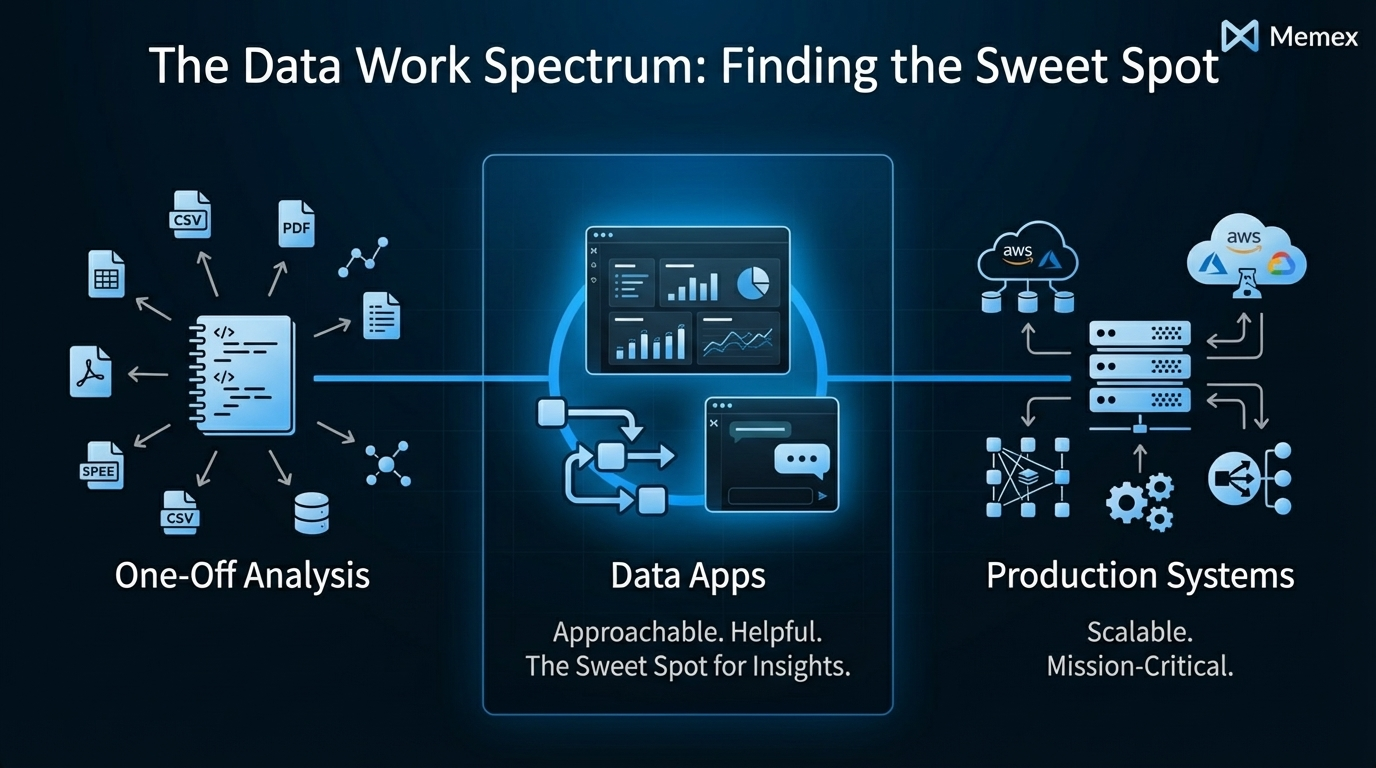
They sit between one-off analysis and fully engineered products. They are more structured than a notebook, lighter than a production system.
The goal is to move from "answer this question once" to "have a system that solves this forever."
You know the drill. Someone asks a question about last quarter's revenue. You open a spreadsheet, pull some numbers, maybe write a quick formula or two. You send the answer. A week later, someone asks the same question with slightly different parameters. You do it again. Then again. Eventually, you realize you've answered the same question twelve times in twelve slightly different ways, and none of those answers live anywhere useful.
This is the reality for most people who work with data but aren't full-time engineers. Product managers, analysts, ops leads, data-savvy founders — we all live in a world of spreadsheets, dashboards, ad-hoc notebooks, manual exports, and fragile glue scripts. The work gets done, but it doesn't stay done. Every insight is a one-time event. Every answer evaporates the moment it's delivered.
At Memex, we think a lot about this problem. And we've come to use a term that might sound technical but actually describes something very practical: the data app.
The Pain of One-Off Work
Let's be honest about what most data work looks like in practice.
You have a Google Sheet that's become a de facto source of truth for something important—maybe customer segments, maybe inventory, maybe campaign performance. You've built formulas that reference other sheets that reference other sheets. You've written a Python script that pulls from an API and dumps results into a CSV. You've got a dashboard somewhere that shows metrics, but the underlying query broke three weeks ago and nobody noticed.

These setups work, until they don't. The problems are predictable: (1) they're fragile, breaking when data formats change or dependencies update; (2) they're opaque, with logic buried in formulas or scripts that only one person understands; and (3) they're not reusable, requiring manual re-execution every time someone needs an answer.
The result is that teams spend enormous amounts of time re-answering the same questions, re-building the same analyses, and re-explaining the same logic. According to Anaconda's 2022 State of Data Science report, data scientists and analysts spend roughly 40% of their time on data preparation and cleaning alone, much of it repetitive work that could be automated or systematized.
This isn't a failure of individual skill. It's a structural problem. The tools we have push us toward one-off work, not reusable systems.
Data + Logic + Repeatability
Here's the simple idea behind a data app: it's any reusable, code-backed way of turning data into something useful.
Every data app combines three ingredients:
Data: from spreadsheets, databases, APIs, files, event streams, or models. This is the raw material.
Logic: queries, transformations, business rules, statistical methods, or machine learning code. This is what turns raw material into insight or action.
A surface: some way for humans or other systems to benefit from that logic repeatedly. This is what makes it an app rather than a one-time script.
That third ingredient is crucial. An analysis you run once and throw away isn't an app. But the moment you wrap that analysis in something reusable—a dashboard others can view, a pipeline that runs nightly, a chat session you can re-execute with new data—you've crossed into data app territory.
We use the word "app" broadly here, and intentionally. When most people hear "app," they think of something with a user interface: buttons, charts, forms. But we think the concept is more expansive. A scheduled script that sends a Slack message every morning is an app. A pipeline that cleans and loads data into a warehouse is an app. A conversation with an AI tool where you iteratively refine an analysis — that's an app too, if you can return to it and run it again.
The common thread is repeatability. You're not just answering a question; you're building a system that can answer that question (or variations of it) forever.
A Simple Taxonomy
Not all data apps look the same. We find it useful to think about three broad categories.
Interactive Data Apps
These are the data apps most people recognize: dashboards, internal tools, admin panels, monitoring consoles, forms, and review queues. They have a visual interface that humans interact with directly.
A dashboard showing real-time sales metrics is an interactive data app. So is an internal tool that lets your ops team update customer records without touching a database. So is a form that collects input, runs it through some logic, and displays results.

The key characteristic is that the surface is visual and interactive. Someone can open a URL, see information, and often take action — all without understanding the underlying code or data plumbing.
Examples include revenue dashboards for leadership, support ticket review queues, inventory management tools, and marketing attribution reports.
Headless Data Apps
Not every data app needs a user interface. Headless data apps are pipelines, syncs, automations, and background processes that run without direct human interaction.
An ETL job that pulls data from an API, cleans it, and loads it into a warehouse is a headless data app. So is a scraper that runs nightly and updates a dataset. So is a scheduled script that trains a machine learning model and saves the results. So is a Python or R script that runs on a schedule behind an API endpoint.
These apps have all three ingredients—data, logic, repeatability—but the surface isn't a visual interface. It's the reliable execution of a process. The benefit flows to humans or other systems indirectly: the data is cleaner, the model is updated, the report is delivered.
Examples include nightly data syncs between systems, automated report generation, feature engineering pipelines, web scrapers that populate research databases, and ML model training workflows.
Conversational Data Apps
This third category is newer and worth explaining carefully. A conversational data app is work done in an interactive, chat-based environment where code runs behind the scenes but the primary interface is natural language.
Imagine you're exploring a dataset. You ask a question, and the system runs Python or R code to compute the answer. You see the result and ask a follow-up. The system writes more code, runs it, and shows you the output. You refine your question. The system iterates. Eventually, you have a chain of logic that answers your question — and that chain is reusable.
This is different from a one-off chat interaction. The key is that you can return to this conversation, or build on it further. All the context of the data structure, nuances, and setup is already there. The "app" is the session itself: a repeatable workflow that wraps data and logic into something you or your teammates can use again.
We've found this pattern increasingly common at Memex. Sometimes the right answer isn't a deployed dashboard or a scheduled pipeline. It's a conversation you can revisit and build on top of without requiring you to publish a separate interface.
Examples include exploratory data analysis sessions you can re-run with fresh data, iterative model evaluation workflows, ad-hoc reporting that lives in a shareable session, and research analysis you can hand off to a colleague.
Between One-Off and Fully Engineered
Data apps occupy a middle ground that's often ignored.
On one end of the spectrum, you have purely ad-hoc work: a quick analysis in a notebook, a formula in a spreadsheet, a SQL query you run and forget. This work has data and logic but no repeatability. It answers a question once and disappears.
On the other end, you have fully engineered systems: production applications with dedicated infrastructure, monitoring, testing, and maintenance. These are highly repeatable but require significant investment to build and operate.
Data apps sit in between. They're more structured and reusable than ad-hoc work — you can run them again, share them with others, and trust them to produce consistent results. But they're lighter-weight than production systems — you don't need a DevOps team or a six-month roadmap to build one.

This middle ground is where most useful data work actually lives. You need something more durable than a one-time answer but less heavy than a full engineering project. You need to move from "I answered this question" to "we have a system that answers this question."
The problem is that traditional tools don't serve this middle ground well. Spreadsheets are flexible but fragile. Notebooks are powerful but not easily shareable or schedulable. Dashboards tools are polished but limited in logic. Data engineering platforms are robust but require real engineering skills to operate.
Building Data Apps with AI
This is where tools like Memex fit in.
We've built Memex to be an AI software engineer specifically designed for data apps. The idea is straightforward: describe what you want, connect to your data, and let Memex handle the building — whether that's writing code, running analyses, or deploying something others can use.
The process usually starts with data. Maybe you have a Google Sheet, a CSV, an API, or a database connection. Memex can connect to these sources, help you inspect and understand what's there, and assist with cleaning and transforming data that's messy or inconsistent.
From there, you can move in different directions depending on what you need. If you want to explore the data, you can work conversationally — asking questions, viewing results, and iterating until you understand what you're looking at. Memex runs Python, R, or other code behind the scenes, handling the technical execution while you focus on the questions.
If you need something more structured, you can ask Memex to build it. Maybe that's a dashboard for your team, an internal tool for managing a process, or a pipeline that runs on a schedule. Memex handles the code generation, dependency installation, debugging, and iteration required to get something working.
And when the thing you've built needs to be shared, Memex can help with that too — deploying interactive apps so teammates can use them without touching code, or setting up headless workflows that run reliably in the background.
The real shift is from "answer this question once" to "have a reusable app or workflow that solves this forever." We've written more about this philosophy in our post on building internal tools, and in our thinking on AI Coding for Product Managers.
The goal isn't to replace your understanding or your judgment. It's to remove the friction between having an idea for a data system and having that system actually exist and work.
From Questions to Systems
Here's the fundamental mindset shift we encourage.
Most data work is framed as question-answering: "What were sales last quarter?" "Which customers are at risk of churning?" "How is our campaign performing?" These are good questions. But they're framed as one-time inquiries, and that framing creates one-time work.
A better framing is: "What system would let us always know sales performance?" "What workflow would continuously identify at-risk customers?" "What app would give the team ongoing visibility into campaign performance?"

This reframing doesn't mean every question needs a complex solution. Sometimes a quick answer is fine. But when you notice yourself answering the same question repeatedly, or building the same analysis over and over, that's a signal. You don't need another answer. You need a data app.
The good news is that building these systems has gotten dramatically easier. Tools like Memex can turn a description of what you want into working code, handle the messy details of data connections and dependencies, and help you iterate until the thing actually works. You can build things yourself.
What you do need is the habit of asking: "Is this a one-time question, or is this a problem I should solve once and for all?"
FAQs
What's the difference between a data app and a regular app? A data app is specifically designed to turn data into insight or action. While regular apps might include data features, data apps are built around the data lifecycle: connecting to sources, transforming information, and presenting results. The distinction is about purpose — data apps exist to make data useful in a repeatable way.
Do I need to know how to code to build a data app? Not necessarily. Tools like Memex allow you to describe what you want in natural language and handle the code generation automatically. You'll benefit from understanding data concepts (what a join is, how APIs work, etc.), but you don't need to write code yourself. The AI handles implementation while you focus on requirements.
What's the difference between a data app and a dashboard? A dashboard is one type of data app — specifically, an interactive data app focused on visualization. But data apps are broader. They also include headless apps (pipelines, automations) and conversational apps (iterative analysis in chat-based tools). A dashboard shows data; a data app might also transform it, automate actions, or run complex logic behind the scenes.
How is a data app different from an ETL pipeline? An ETL pipeline is a type of headless data app. It has data (the sources), logic (the transformations), and repeatability (the scheduled execution). We call it a data app because it fits the same pattern. The term "data app" is intentionally broad to capture all the ways we wrap data and logic into reusable systems.
When should I build a data app instead of doing ad-hoc analysis? The signal is repetition. If you've answered the same question more than twice, or if you know others will ask the same question, that's a good candidate for a data app. The upfront investment in building something reusable pays off quickly when it eliminates ongoing manual work.
Want to build your own data apps without the engineering overhead? Try Memex for free or join our Discord community to see what others are building.